
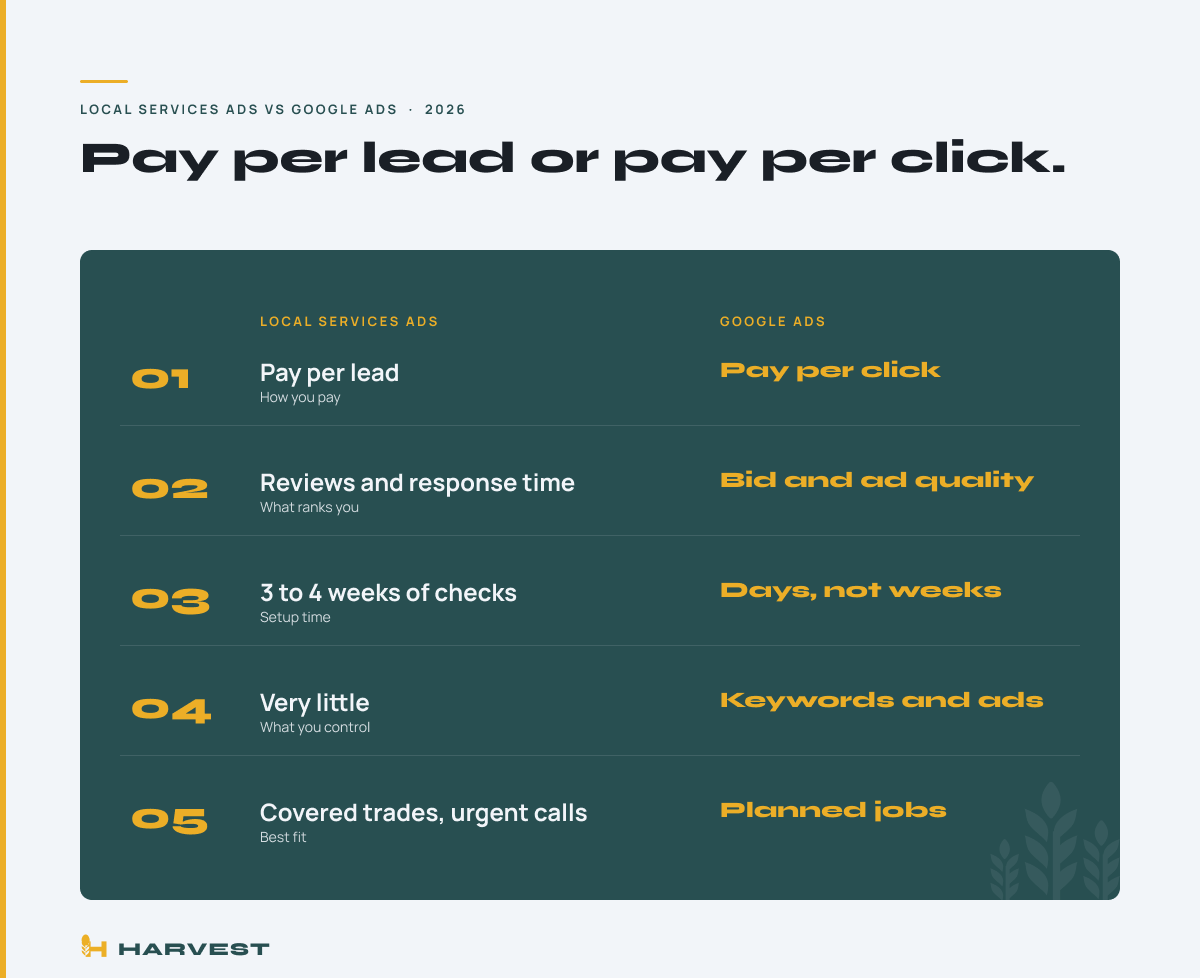
Local Services Ads vs Google Ads comes down to how you pay and who controls the result. Local Services Ads charge you per lead, meaning a call or message from a customer. Regular Google Ads charge you per click, whether that click calls you or not.
Both show up when someone in Doylestown or Lansdale searches for a plumber, an electrician or a roofer. They sit in different spots, run on different rules, and fit different jobs.
Harvest Digital Marketing builds Google Ads accounts for trade businesses. Every Local Services Ads rule below comes from Google’s own help pages, linked so you can check it yourself.
What this post covers
- The short answer: pay per lead vs pay per click
- How Local Services Ads work
- How regular Google Ads work
- When each one fits your trade
- What the wrong choice costs you
- What to do this week
The short answer: pay per lead vs pay per click
Local Services Ads charge per lead. Regular Google Ads charge per click. That one difference drives almost everything else.
With Local Services Ads, Google charges you when a customer calls or messages you through the ad. Google’s Local Services Ads overview says you pay only for leads related to your business and the services you offer.
These ads sit at the very top of the results with a Google Verified badge. That badge tells a homeowner the business passed Google’s screening.
With regular Google Ads, you pay each time someone clicks, whether they call or not. In exchange, you control nearly everything: the searches you show for, the wording, the hours, and the page the click lands on.
So Local Services Ads trade control for simplicity. Google Ads trade simplicity for control. Most trade businesses with steady demand end up running both, starting with whichever one fits their stage.
How Local Services Ads work for a trade business
Local Services Ads are Google’s pay per lead ads for service trades like plumbing, electrical, HVAC and roofing. You set a budget and either name the most you will pay per lead or let Google bid for you.
Your position is not just about money. Google’s page on how Local Services Ads rank names your bid plus how likely your ad is to produce a lead. That includes your rating, your number of reviews, your average response time, your photos, and how relevant your services are to the search. Google also says missed calls can hurt your ranking.
Getting in takes paperwork. In many trades and locations, Google requires background checks on the business, the owner and field workers, plus license and insurance checks. Google’s screening and verification guide says this takes 3 to 4 weeks after you submit documents.
You write almost nothing. No headlines, no landing page. Your reviews and your phone habits do the selling.
How regular Google Ads search campaigns work
A Google Ads search campaign shows a text ad when someone types a phrase you chose, like “water heater replacement” or “panel upgrade cost.” You pay when they click. The click goes to a page you pick, ideally one built for that exact service.
You block searches with negative keywords, a list that keeps you off searches like “plumber jobs” or “DIY drywall repair.” You write the ad, set the hours, and pick the towns, from Newtown to West Chester.
That control cuts both ways. Loose keywords with no negatives can spend a month’s budget on clicks that never call. Our standard: start with tight keywords, review the real searches every week for the first 60 to 90 days, and send every click to a service page, never the homepage. Our breakdown of what $1,000 a month buys in Google Ads for HVAC shows that math at three budgets.
Search ads also reach commercial work and services outside Google’s categories.
When each one fits your trade
Start with Local Services Ads if your trade is covered in your area, your reviews are solid, and someone answers the phone every time it rings. Emergency work fits best: the burst pipe, the dead furnace, the leak over the kitchen.
Start with Google Ads if your trade is not covered, if you sell bigger planned jobs, or if you need one service in front of one town. A Bethlehem hardscaper selling patios, or a contractor chasing commercial work, gets more from search ads they control.
Run both once each one proves itself. Together they cover more of the results page.
One rule decides either way: if calls go to voicemail, neither works. Local Services Ads rank you lower for missed calls, and search ads pay for clicks that hear a recording. Fix the phone first.
What the wrong choice actually costs you
Picking the wrong ad type does not just waste money. It teaches you the wrong lesson: that ads do not work for your business.
Run this example on your own numbers. Say your average job is $800 and you close 1 in 3 real leads. Each lead is worth about $267 in revenue. After materials and labor, you might set your ceiling at $80 per lead.
Now say loose search ads pay $8 a click and only 1 in 30 clicks turns into a call. Each lead costs $240, three times the ceiling, and the owner calls Google Ads a failure. Local Services Ads with thin reviews may barely show at all.
Same $8 click, tight keywords, and a service page that turns 1 in 10 clicks into a call: the lead drops to $80. The gap was never the ad type. It was the page, the keywords, and who picked up. Our Google Ads for trades work starts with this math before a dollar is spent.
What to do this week
- Start signup in Google’s Local Services Ads tool to see if your trade and town are covered.
- Count your Google reviews against the top three names on the map for your main service. Behind? Ask your last ten happy customers this week.
- Pull your call log for the last 30 days and count missed calls during business hours.
- If you run search ads now, open the search terms report, the list of what people actually typed, and block anything that is not a paying job.
- Make sure paid clicks land on a service page with your phone number at the top.
- Write down your ceiling: average job value, close rate, and the most you can pay for one lead.
Not sure which one fits your business? See where you’re losing leads and get a plain breakdown of where your calls go and who is getting them.

Frequently asked questions
Are Local Services Ads better than Google Ads?
Neither is better across the board. Local Services Ads suit covered trades with strong reviews and fast phone habits, because you pay per lead. Google Ads suit planned jobs, commercial work and services outside Google’s categories, because you control the keywords and the landing page.
How much do Local Services Ads cost per lead?
It depends on your trade, your market and your bid. Google lets you set the most you will pay per lead or let it bid for you, and says higher quality profiles may pay less per lead. Check the estimate inside your own account before you commit a budget.
What is the Google Verified badge?
It is the mark that appears on Local Services Ads after a business passes Google’s screening. Depending on your trade and location, that can include background, license and insurance checks. Older articles call it Google Guaranteed.
Do I get charged for junk leads on Local Services Ads?
You are charged per lead, but Google offers credits for leads it finds invalid, such as wrong numbers and spam. Review your lead credits in the account every month so you know what you actually paid for.
Can I run Local Services Ads and Google Ads at the same time?
Yes. They show in different spots on the results page and run on separate budgets. Many trade businesses run both once each one has proven it can book jobs at a cost they can afford.
Ads bring calls now. Local SEO for trade businesses keeps them coming after the ads stop, and contractor web design built to turn clicks into calls makes every paid click count. For bigger planned jobs, Meta Ads for homeowners in your area plant the idea before anyone searches. For a straight answer on your business, book a free 15 minute strategy call or contact Harvest Digital Marketing. We work month to month, and you can cancel with 14 days notice.